← Guides
Progressive-overload hints
When you’ve earned it, Vivrep suggests the next weight up — and tells you why.
When a hint appears
- You hit the top of your rep range on every working set, at the same weight, in your last two sessions of that exercise.
- In a linear program such as 5×5 Strength Foundation or Linear Strength Starter, one good session is enough.
- Your effort counts too: if your last session of the exercise was rated All out (or you logged RPE 10 on it), Vivrep tells you to hold the weight instead; if it was Easy, one session at the top is enough.
- Hints are for weight-and-reps exercises. Warm-ups, drop sets and failure sets don’t count.
How much it goes up
- Upper body: +5 lb or +2.5 kg by default.
- The big lower-body lifts in Vivrep’s programs (squat, deadlift and similar): double that. Accessories such as leg curl step the normal amount.
- Dumbbells: your gym’s dumbbell step. Already at your heaviest pair? The hint is +1 rep instead.
- Barbells and machines: twice your smallest plate once you’ve edited the gym’s plates, otherwise your Barbell & machine step (5 lb or 2.5 kg if unset). With edited plates the new weight is the lightest one your gym’s plates can load. Past what they load, the hint is +1 rep.
Use a hint
- Look for a chip such as 2 ready to go up on Today’s workout, and a lime ↑ chip such as “↑ +5 lb” under the exercise on Review.
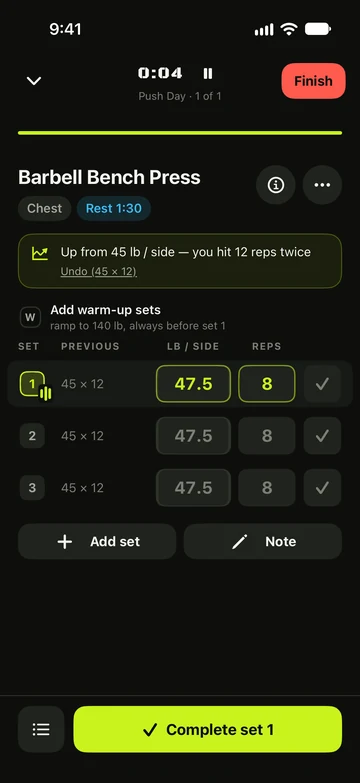
- Start the workout. Set 1 is filled in at the new weight, with a note such as Up from 135 lb — you hit 12 reps twice.
- Log the set as usual, or tap Undo (135 × 12) to go back to last time’s numbers.
Still stuck?
Email us. Tell us which screen you were on, your iPhone model and your iOS version.