← Guides
Plate calculator
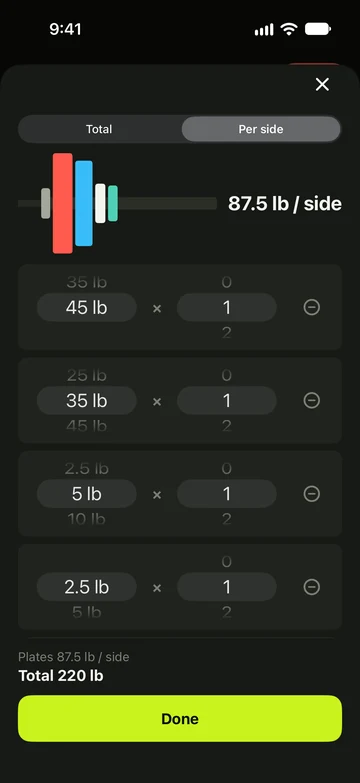
Build one side of the bar plate by plate, and choose whether you enter the total or the weight per side.
Build one side
- Start a barbell, Smith machine, EZ bar or trap bar exercise.
- Tap the plates button on your current set, or the PLATES PER SIDE row on the keypad.
- Tap Add plate, then choose the plate size and how many of it go on one side. Add a row for each size.
- Check the totals underneath, for example Plates 30 lb / side and Total 105 lb.
- Tap Done to use the weight, or swipe down to leave without changing anything.
- The sheet draws one side of the bar. It opens with the plates for the weight you already have; with only the bar, there are no rows.
- With no plates, the weight reads Bar.
Total or per side
- Open the plate sheet on a bar exercise.
- Tap Total or Per side at the top. The choice is saved at once for that type of bar, for every exercise on it.
- Barbell, trap bar and Smith machine start on Per side; EZ bar starts on Total.
- In Total, the total sits on top. Type it, or step it with − and + by twice your smallest plate; the plates for each side are worked out below.
- If your plates can’t make the total exactly, the sheet reads “Nearest loadable: 135 lb”. The weight you typed is the one logged.
- In Total, set rows, Previous, banners and the Watch show the total weight, like any other exercise.
Weight per side
- In Per side, the weight box during a workout is the weight on one side. The column header reads LB / SIDE, and an empty bar reads Bar.
- On the keypad, type the weight for one side. − and + step by your gym’s smallest plate.
- The plate line shows the sum, for example “bar 45 lb + 30 lb × 2 = 105 lb”. Free users see it with a Pro badge.
- Logging snaps to the nearest weight your gym’s plates can load; halfway rounds down. A weight heavier than your plates can load is logged as you entered it.
- History, records, Review, the summary and the workout builder still show the total weight.
Bars and plates
- A barbell uses your gym’s bar weight — 45 lb or 20 kg unless you change it under Bars in the gym editor.
- You can also change it in the plate sheet: tap the lock on the Bar 45 lb row, pick a weight, then tap Done. That changes your gym’s bar for that type of bar.
- An EZ bar counts as 25 lb (10 kg) and a trap bar as 60 lb (25 kg).
- Until you edit them, plates in lb are 45, 35, 25, 10, 5 and 2.5, and in kg 25, 20, 15, 10, 5, 2.5 and 1.25, with as many pairs as you need.
- Each gym can have its own bars and plates: open the gym editor, then Plates (Pro). Turn sizes on or off and set how many pairs you own. The plate sheet and the keypad both use them.
Still stuck?
Email us. Tell us which screen you were on, your iPhone model and your iOS version.