
Watch the work add up
A history calendar, bests and trends, recovery for every muscle, widgets, and a backup of everything in one file.
HistoryFree
Every workout, on the calendar
History is a month of heat tiles: the brighter the tile, the more volume you moved that day. Gold dots mark days you set a best, and your week streak sits on top.
- Tap a day for its workouts, then open one for every set, warm-ups included.
- Fix a typo later: edit sets, add an exercise or change the times, and your records update to match.
- A week counts toward your streak when you train on as many days as you planned.
 Workouts
 Volume
 Calories
BestsFree
Bests that get noticed
Beat your heaviest weight, your most reps at a weight or your best estimated 1RM and the set glows, with a NEW BEST note mid-workout.
- After the workout, the biggest moment gets the full screen: a rank up, a lifetime volume or calorie milestone, a streak, a finished week or a new best.
- Everything else lands as chips on the summary, so nothing gets in your way.
- You › Milestones has four tracks: Workouts, Volume, Calories and Streak, the first three with 10 levels (I–X). Streak has no level: it shows your current streak in weeks, from 2 up to 104. Workouts run from your first to your 1,000th.
- Back after a break? You get a welcome back, not a guilt trip.
 Streak4 weeks
TrendsFree · Pro adds more
Trends that show the work, and Pro Insights
Progress shows your volume against your recent average, your top exercises with an estimated-1RM line, and how many sets each muscle got this week.
- Tap any exercise for its chart: estimated 1RM, best set, volume or sets, plus its records.
- Heart rate and calories per workout. Workouts logged without a Watch still get a calorie figure, an estimate drawn as lighter bars.
- Export one exercise’s sessions as a CSV from its chart.
- INSIGHTS (Pro) turns your sets into five cards: heart-rate efficiency at the same weight and reps (“Bench 185 × 5 now takes 9 bpm less than in June”), left / right balance, rep maxes from 1 to 15 with your estimated 1RM, plateaus with ideas to try, and a month or year in review to share.
- Strength standards (Pro) is in the Pro section of History › Progress: bench press, back squat, deadlift, overhead press, barbell row and pull-up as a multiple of your body weight, with a level from Novice to Elite and what the next one takes. A lift that rises a level adds a line on the workout summary, like “Barbell Bench Press is now Intermediate”.
Free: Week and 8 weeks, and each lift’s multiple of body weight. Pro: a full year, 6 months, a year or all time per exercise, Insights, and strength standard levels.
Guide: History, records & achievementsMuscle mapFree · Pro adds more
Recovery, muscle by muscle
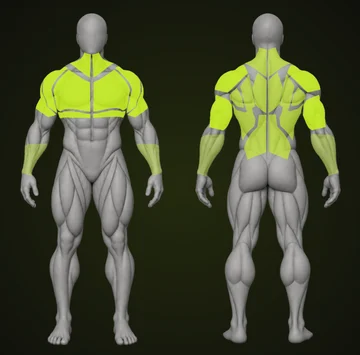
The muscle map lights up each muscle by the sets it got this week, against a target of 10. Short somewhere? It suggests an exercise and adds it to a workout for you.
- Recovery gives all 11 muscle groups a percentage from your sets, how hard they were and the hours since: Fresh, Recovering or Fatigued.
- Today tells you when a workout Fits your recovery.
- Training one muscle well below the rest? Today shows a line like “Hamstrings: under your usual in 3 of the last 4 weeks.” with a button that adds a fitting exercise to one of your workouts. Nothing is saved until you tap Save. Not now pauses it for 4 weeks and Don’t suggest this mutes it. Change it in You › Settings › Muscle nudges.
- Two all-out workouts in a row? Today suggests a lighter day.
- Draw the map on a neutral figure, or pick one of nine guides.
Free: the weekly muscle map on the neutral figure, the muscle nudge and the lighter-day line. Pro: recovery and the nine guides.
Guide: Physique
BodyFree · Pro adds more
Measurements and a private photo vault
Track body weight for free. Pro adds shoulders, chest, arms, waist and thighs, a shoulder-to-waist ratio, and how each one changed over about 90 days.
- Find Shoulder : waist in the measurement list on Physique › Body, once a pair of readings is available.
- Bulk and cut phases are free: on your body-weight target choose Gaining, Cutting or Maintaining and a Gentle, Steady or Quick pace. Vivrep draws your pace as a dashed line and tells you whether your trend is on it.
- Progress photos live in an encrypted vault inside Vivrep, opened with Face ID or your passcode (you can turn the lock off in Settings), and never added to your camera roll.
- A pose guide lines you up with your last photo; Compare puts your first and latest side by side.
- An optional reminder every 30 days to measure again.
Free: body weight and bulk / cut phases. Pro: body measurements, the shoulder : waist card and the photo vault.
Guide: Physique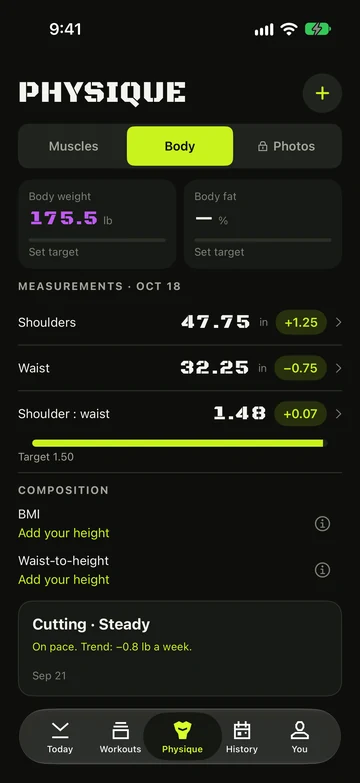
WidgetsPro
Home and Lock Screen widgets
Your week at a glance: streak, the week’s ring, your next workout with a Start now button, and the muscles that need more rest.
- Small and medium Home Screen widgets, plus round and rectangular Lock Screen widgets.
- Nothing planned? It offers Start workout instead.
- Always dark, in your app language.
Free: the widget shows the Vivrep logo with a **Start workout** button and an **Unlock Pro** link.
Guide: WidgetsSharingFree
Share the work
Turn a workout into an image: your stats, the muscles you trained lit up on a body figure, and your best set of each exercise, with a star on new bests.
- Story or Square, or a whole month with its calendar and every workout.
- Swipe between With muscle map and Without muscle map; Vivrep remembers your pick.
- Turn Show weights off to share reps only.
- Save to Photos or Share… straight to any app. Made on your iPhone; nothing is uploaded.
- Never shows your photos, measurements, notes, heart rate or gym.
Your dataFree
Your history, in your hands
Back up everything to one .vivrep file — workouts, plans, gyms and settings — and keep it wherever you like. Coming from another app? Bring your history with you. All free.
- Back up builds the file, then Save to Files or Share… sends it where you like. Add your progress photos if you want them, locked with a password.
- Restore from backup: Merge adds what’s missing, Replace swaps everything. A safety copy is kept and you can undo for 24 hours. It’s how you move to a new iPhone without Pro.
- Import from another app reads a Strong, Hevy or Fitbod CSV export. Names are matched to the library; anything unsure goes to Check exercises, and workouts already in Vivrep are skipped.
- Export CSV gives you every set as a spreadsheet.

Ready when you are.
Download on the App StoreComing soon to Google Play