← Guides
Getting started
Set up your profile, then build your own workout or choose a recommended program.
Answer a few questions
Setup opens the first time you launch the app. Your answers are saved as you go.
- Tap Get started, then enter your units, birth year, height, body weight and sex.
- On Would you like some guidance?, choose Build my own to finish setup with defaults and open the workout builder, or Guide me for recommendations.
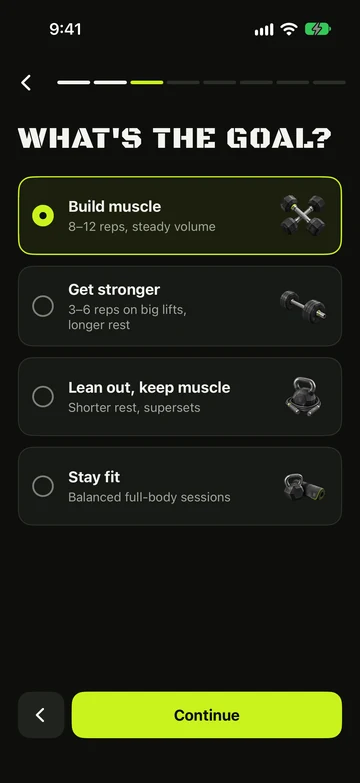
- If you chose guidance, select your goal on What's the goal?.
- Set your experience, training days and session length on How do you train?.
- Choose focus areas and movements to avoid on Focus & limits.
- Choose your gyms, default gym and available equipment, then continue to Recommended programs.
Pick your starter plan
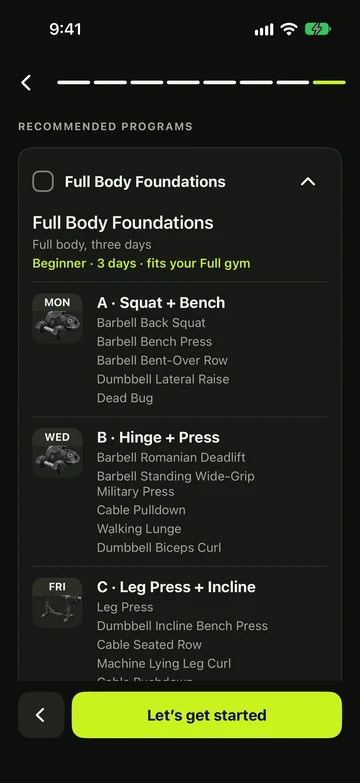
Recommended programs lists programs matched to your answers. Previewing a program does not select it.
- Open a program preview to inspect its training days and exercises.
- Select the program you want, then tap Let’s get started to add it and finish setup.
- With no program selected, Let’s get started finishes setup without adding workouts. You can create one later.
Still stuck?
Email us. Tell us which screen you were on, your iPhone model and your iOS version.