← Guides
Supersets
Pair exercises back to back with no rest between them, then rest once after each round.
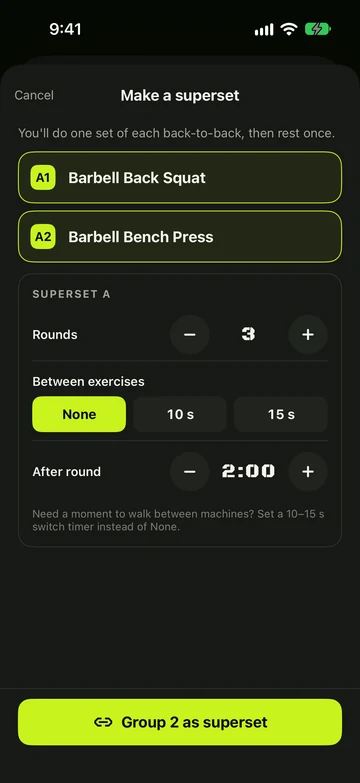
Make a superset
- Tap Superset on Review or in the workout builder.
- Pick 2 or more exercises in the order you’ll do them, then tap Superset (2) (the number is how many you picked).
- Set the Rounds, the rest Between exercises (None, 10 s or 15 s) and the rest After round.
- Tap Group 2 as superset.
- Already training? Tap Exercise options › Make a superset to pair the current exercise with others.
Log a superset
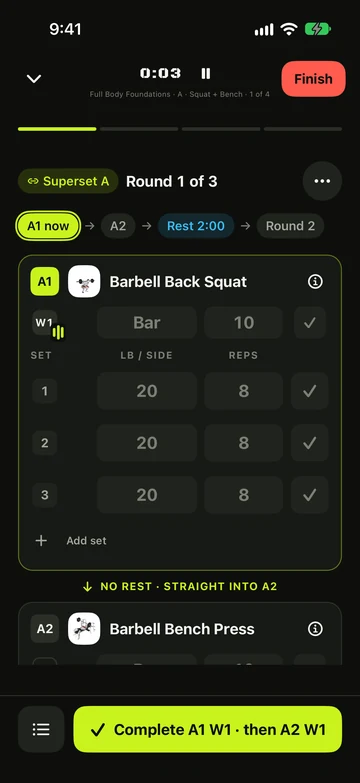
- Log the first exercise with Complete A1. The next exercise comes up straight away, with no rest.
- Log the last exercise of the round with Finish round 1 — the rest starts once, for the whole round.
- Want another round? Tap +1 set: every exercise in the superset gets one more set, copied from its last one.
Change or undo it
- Drag a superset to move it — the whole block moves together.
- Tap Superset options to change rounds and rests, or Ungroup to split it back into single exercises.
Still stuck?
Email us. Tell us which screen you were on, your iPhone model and your iOS version.